Discord bot
Introduction
This post introduces my first Discord bot designed to remind users of upcoming events throughout the week while automatically updating the weekly message. The Python code for this bot is accessible on my github.
How to use
After pulling the GitHub project, you need to create a ‘.env’ file at the root of your bot folder like on the screenshot right below. This file must include the following three variables: DISCORD_API_TOKEN, channel_id, and guild_id. You can find the DISCORD_API_TOKEN in your application bot settings, while the channel_id and guild_id can be obtained from your Discord guild and channel settings, respectively. Ensure to select the channel_id of the desired channel where you want the bot to send messages every week.

Then, you can run main.py to use the bot.
Customize
It is possible to customize the bot by modifying the variables below in the main.py file:
# Constants
DAY = 6  # The day on which the weekly reminder is triggered (0 is Monday, 6 is Sunday)
HOUR = 12  # The hour (UTC) at which the weekly reminder is triggered
MIN_MIN = 20  # The minimum minute within the HOUR for the weekly reminder
MIN_MAX = 40  # The maximum minute within the HOUR for the weekly reminder
DAYS_INTERVAL = 7  # The number of days into the future for considering events
NB_MINUTES_LIST_EVENTS_SLEEP = MIN_MAX - MIN_MIN + 1  # Interval to sleep after posting events in the channel
NB_MINUTES_WEEKLY_REMINDER_LOOP = MIN_MAX - MIN_MIN - 1  # Interval for the weekly reminder loop
NB_MINUTES_CHECK_CHANGES_LOOP = 20  # Interval to check for changes in events

# Messages
intro_txt = "Bonjour à toustes ! Voici les événements de cette fin de semaine au ZincADit, n'hésitez pas à venir bénévoler ❤️ :\n \n"
no_event = "Il n'y a pas encore d'événement programmé dans les prochains jours. \n\n Retrouvez toutes les informations des évenements sur : https://www.zincadit.beer/"
conclusion_txt = "Retrouvez toutes les informations des évenements sur : https://www.zincadit.beer/"
The basic settings are configured to send a message every Sunday at noon, between 20 and 40 minutes past the hour. This message includes events scheduled for the upcoming 7 days. A sleeping time of 21 minutes (40-20+1) is set to ensure that the message is not sent twice. The “weekly_reminder” loop is checked every 19 minutes (40-20-1) to determine if it is time to send a new message. Changes are monitored, and the message is updated every 20 minutes.
Additionally, you need to customize the message before events using “intro_txt,” the message after events with “conclusion_txt,” and the message for when there are no events with “no_event.”
When there are events it will send a message like this:
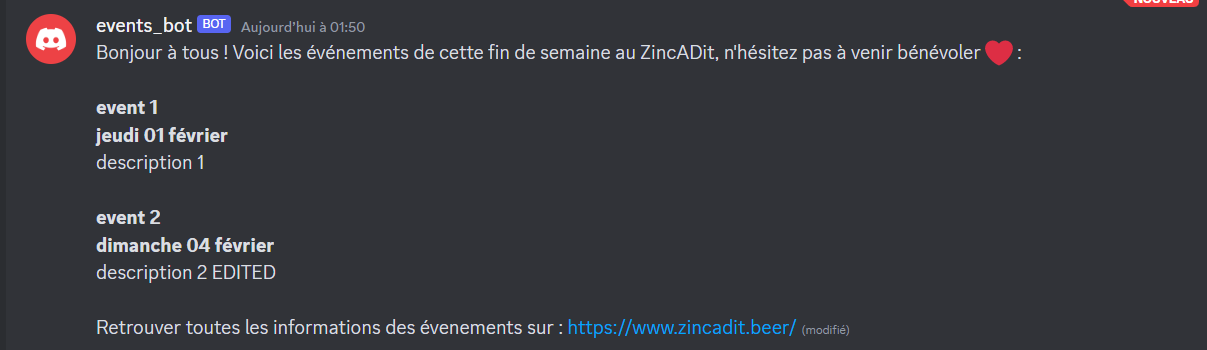
When there are no event it will send a message like this:

A second set of constants is commented. Those variables are setted to test the bot. You just need to set “DAY_” and “HOUR_” accordingly to the current day (0=monday, …) and current hour and can test that messages are well edited few seconds after modifying events title, date or description.